Style Guide

The department website style guide is a set of standards to maintain consistency and uniformity throughout the website in order to best support the Department of Radiology's branding.

TYPOGRAPHY

Header 1 - (H1) Primary Header

Header 2 - (H2) Secondary Header

Header 3 - (H3) Tertiery Header with Built-in Line

Header 4 - (H4) Quadrary Header


Body Text

Example of Body Text

Normal - (P) paragraph body text. Words or phrases can have links. There will also be bolditalic and underline styling options. You will also have the ability to have superscript1, useful for references, yay!

Text Styles

Bold text (B)

Italic (I)

Underline (U)

Superscript1

Lists

Bulleted List - Unordered List

  • one
  • two
  • three
  • four
  • five
  • six

Numbered List - Ordered List

  1. one
  2. two
  3. three
  4. four
  5. five
  6. six

Horizontal Rule


This is an example of a quote style.  This is useful to showcase patient or student testimonials.

First Last Name, Title

Links

Links to words or phrases should be clearly relevant.  Avoid “Click here”, “here”, or “more” links. Instead, describe the destination of the link.

Here are examples of link types:

Email address:

Should be all in lowercase.
[email protected]


*If possible link to the direct url to source for doc, pdf files if not an original file.

*Documents (doc, xls, pdf or ppt files):

Highlight the title of the document and add the file type in parenthesis.  
Link to Word document files (doc).
Link to Excel files (xls).
Link to Adobe Acrobate files (pdf).
Link to PowerPoint files (ppt).

External sites outside of radiology.ucsf.edu: 

Should clearly state name of the website.

For more information about the university's visual standards, visit the UCSF Visual Identity website.

Images

Resizing Images

Double click onto your image or open it using Preview.  Select ToolsAdjust Size, and Save.

Compress Image File Size

To avoid slow load time, compress high resolution images before posting.  You can use this link for compressing your images after you have resized the image:  https://tinyjpg.com/.  Drop your .jpg or .png files onto the page and download.  

Recommended Image Size

*Image use

Width x Height in pixels

In body text...

450 x 300

Image spanning in body text...

570 x 320

Two column text with image

570 x 420

Headshots**

70 x 100 (thumbnail)
100 x 135
150 x 200 (profile)

*Respect the copyright, licensing, and attribution requirements of any image you use.  Patient-sensitive information should be removed before posting.
**Avoid mugshots, use as much natural light as possible.

Directory File System

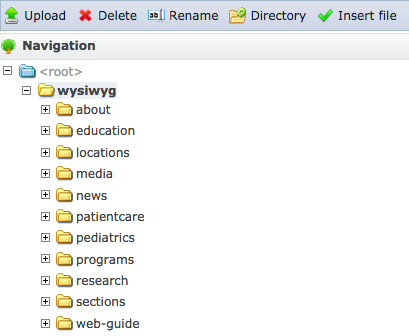
Images should be uploaded to appropriate folders.  Please make sure that image uploads go into their proper folders.  For example, uploads to research labs should follow this directory structure, wysiwyg>research>labs>lab_name.  For clinical sections, follow this directory, wysiwyg>sections>section_name.
Example of Image Right Justified

To aligned the image to the right of the text, first place the cursor at the beginning of the paragragh. Then upload the image. Select the image by clicking on it once. Then press the Right Align paragraph alignment icon.  To give the image a little spacing around it so it does not butt up against the text, add HSpace 15 and VSpace 5 to its image property.

Bulleted list:

  • To aligned the image to the right of the text, first place the cursor at the beginning of the paragraph.
  • Upload image
  • Select the image by clicking on it once.
  • Then press the Right Align paragraph alignment icon.


Example of Two Column with Image (Right/Left)

(Best to use limited copy in this type of format).  Main content image right... Main content image right... Main content image right... Main content image right... Main content image right... Main content image right... Main content image right... Main content image right... Main content image right... 

(Best to use limited copy in this type of format). Main content image left... Main content image left... Main content image left... Main content image left... Main content image left... Main content image left... Main content image left... Main content image left... Main content image left... Main content image left... 


Accordion Box Formatting

What works:

  • Header format
  • Text format
  • Lists (ordered/numbered)
  • Links
  • Images
  • Text alignment
  • Embedded videos

Move accordion boxes by grabbing the upper left corner of box and drag.

Accordion Box Limitations

​What does not work in accordion boxes:

  • Image captions
  • Anchors
  • Columns

Columns

Two Columns of Text

Create two columns of text by selecting the Create two column icon at top tool bar.  This works best with equal amount of text to fill in both columns equally. This gives a visual shape of two blocks of text.  Best to use limited copy in this type of format. 

Lorem ipsum dolor sit amet, bold adipisicing elit, sed do eiusmod tempor incididunt ut labore et dolore magna aliqua. Ut enim ad minim veniam, quis nostrud exercitation ullamco laboris nisi ut aliquip ex ea commodo consequa aute irure dolor in reprehenderit in voluptate velit esse cillum dolore eu fugiat nulla pariatur. 

 Three Columns of Text

Create three columns of text by selecting the Create a three column icon at top tool bar.  This works best with equal amount of text to fill in all three columns.  Best to use limited copy in this type of format

Lorem ipsum dolor sit amet, bold adipisicing elit, sed do eiusmod tempor incididunt ut labore et dolore magna aliqua. Ut enim ad minim veniam, quis nostrud exercitation ullamco laboris nisi ut aliquip ex ea commodo consequat. 

Duis aute irure dolor in reprehenderit in voluptate velit esse cillum dolore eu fugiat nulla pariatur. Excepteur sint occaecat cupidatat non proident, sunt in culpa qui officia deserunt mollit anim id est laborum.  Ut enim ad minim veniam.


Related People Field

Type in Faculty name and it will pull up their headshot, name, and title linking to their bio page.  
Note:  It will only show up at the bottom of page.

Professor Emeritus
Professor Emeritus

Related Content